Showing posts with label XUL. Show all posts
Showing posts with label XUL. Show all posts
Sunday, 4 January 2009
XUL for Java: stucked (for the moment)
Remember This post: I just created a new java.net project to allow to use XUL declarative scripts out of the box with Java, and allow to bind them at will with Java code or even other scripting languages as well. The code comes from another project were it was working very well, but after extracting it from this project, I still have a big big problem with accessing some Javascript code from the XUL script (which makes the whole thing unusable of course for the moment). I know it's a trivial problem because the same use case works like a charm in the original implementation, I must have deleted the wrong line of code somewhere...


Sunday, 2 November 2008
new XUL on Java project
Remember this June post about using XUL, Javascript, and Beanshell in a ARINC 661 Client-Server framework ?
Well it occurred to me that the XUL / Javascript / Beanshell part of this was not specific to ARINC661 and could be useful to others as well.
Also if you look in the wild you will only find two Java XUL frameworks:
So why not sharing some code, being able to use XUL "out of the box" in Java can be useful, and even cool ;-)
So let me introduce my new project: javaXUL.
javaXUL is not intended to compete with much more complete RIA offerings, such as Flash, Silverlight or javaFX. Instead it tries to leverage the expressivity of XUL in the java developement area. Compatibility with Mozilla XUL (such as the Firefox implementation) is a goal, but ease to use in the Java world is also one.
The goal of version 0.1 (underway) is to be able to use javaXUL "out of the box" to add user-defined UIs on Java projects:
And now, Just a simple example for your pleasure:
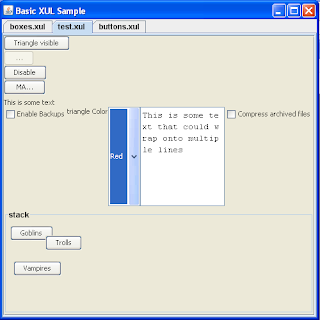
Lets look at the code for this example (its available in the javaXUL website):
All you have to do is:
You can already grab the code and make it work. a LOT of things need to be done on it of course, but I think it can already be useful. As soon as the ability to add other script engines than Javascript has been added I will post a first 0.1 version. For now, consider it a Beta ;-)
Well it occurred to me that the XUL / Javascript / Beanshell part of this was not specific to ARINC661 and could be useful to others as well.
Also if you look in the wild you will only find two Java XUL frameworks:
- A Java project called jXUL had exactly this goal, but it seemed that its development stalled very quickly in 2001, while still in Beta or even Alpha stage (no activity since then)
- Luxor is huge and complex, and also has no activities since some years
So why not sharing some code, being able to use XUL "out of the box" in Java can be useful, and even cool ;-)
So let me introduce my new project: javaXUL.
javaXUL is not intended to compete with much more complete RIA offerings, such as Flash, Silverlight or javaFX. Instead it tries to leverage the expressivity of XUL in the java developement area. Compatibility with Mozilla XUL (such as the Firefox implementation) is a goal, but ease to use in the Java world is also one.
The goal of version 0.1 (underway) is to be able to use javaXUL "out of the box" to add user-defined UIs on Java projects:
import existing sources and make them compilemake them work on simple use casesadd simple examplesallow setting of Look and Feel- ability to add other script engines than Javascript
And now, Just a simple example for your pleasure:

Lets look at the code for this example (its available in the javaXUL website):
import com.sun.java.swing.plaf.windows.WindowsLookAndFeel;
import java.awt.BorderLayout;
import java.net.URL;
import javax.swing.JComponent;
import javax.swing.JFrame;
import javax.swing.JScrollPane;
import javax.swing.JTabbedPane;
import org.xul.script.scripts.AbstractScriptContext.JSFunctionBinding;
import org.xul.script.scripts.ScriptListener;
import org.xul.script.xul.DefaultScriptManager ;
import org.xul.script.xul.model.XULDocument;

public class BasicXULSample extends JFrame {
    private JTabbedPane pane = new JTabbedPane();
    private XULListener listener = new XULListener();

    public BasicXULSample() {
        super("Basic XUL Sample");
        this.setLayout(new BorderLayout());
        this.add(pane);
        this.setDefaultCloseOperation(JFrame.EXIT_ON_CLOSE);
        init();
        this.setSize(500, 500);
    }

    private URL getResource(String name) {
        return Thread.currentThread().getContextClassLoader().getResource(name);
    }

    private void init() {
        DefaultScriptManager manager = new DefaultScriptManager ();
        manager.setLookAndFeel(new WindowsLookAndFeel());
        manager.setScriptListener(listener);
        try {
            URL boxes = getResource("org/xul/samples/resources/boxes.xul");
            XULDocument boxesdoc = manager.addXULScript(boxes.toString(), boxes);
            JComponent boxescomp = boxesdoc.getRootComponent();
            if (boxescomp != null) {
                pane.addTab(boxesdoc.getFile().getName(), new JScrollPane(boxescomp));
            }
            URL test = getResource("org/xul/samples/resources/test.xul");
            XULDocument testdoc = manager.addXULScript(test.toString(), test);
            JComponent testcomp = testdoc.getRootComponent();
            if (testcomp != null) {
                pane.addTab(testdoc.getFile().getName(), new JScrollPane(testcomp));
            }
            URL buttons = getResource("org/xul/samples/resources/buttons.xul");
            XULDocument buttonsdoc = manager.addXULScript(buttons.toString(), buttons);
            JComponent buttonscomp = buttonsdoc.getRootComponent();
            if (buttonscomp != null) {
                pane.addTab(buttonsdoc.getFile().getName(), new JScrollPane(buttonscomp));
            }
            manager.setActive(true);
        } catch (Exception ex) {
            ex.printStackTrace();
        }
    }

    public static final void main(String[] args) {
        BasicXULSample sample = new BasicXULSample();
        sample.setVisible(true);
    }
    private class XULListener implements ScriptListener {
        public void print(String message) {
            System.out.println(message);
        }
        public void setCurrentJSScript(JSFunctionBinding binding) {
        }
        public void showException(String message, Exception e) {
            e.printStackTrace();
        }
        public void showException(Exception e) {
            e.printStackTrace();
        }
    }
}
All you have to do is:
- Create a Scriptmanager (the library provide a ready-to-use DefaultScriptManager implementation)
- provide a ScriptListener which will be fired for actions on the javaScript side (for now, it is very very basic, I agree)
- Add various XUL Scripts for this manager, and grab the corresponding components:
   URL test = ...;
   XULDocument testdoc = manager.addXULScript(test.toString(), test);
   JComponent testcomp = testdoc.getRootComponent();
You can already grab the code and make it work. a LOT of things need to be done on it of course, but I think it can already be useful. As soon as the ability to add other script engines than Javascript has been added I will post a first 0.1 version. For now, consider it a Beta ;-)
Sunday, 8 June 2008
Have fun with ARINC 661, XUL, Javascript, beanshell, and Java
One of my project is a Client-Server ARINC 661 framework which use a lot of socket-bound activity from the Client (called User Application in the standard, it handles the logic here) to the Server (which perform the graphic rendering).
The communication protocol in ARINC 661 is specific and a bit complex (no SOAP, no REST, no CORBA, not RMI, but purely specific binary messages on top of the lower-level bus-level layer protocol). So to ease development of Java clients, I developed a generic API to handle this.
I thought it could be cool to allow users to prototype the logic of the Client. Using beanshell for this was the logic thing to do (pardon the pun), because it is very close to Java, so transcoding from beanshell to Java is straigthforward.
The second step was to be able to add scripted control panels for the Client. I don't want to recreate the wheel, so I decided for the use of XUL. One cool side-effect is that users would be able to debug their scripts using Firefox.
OK, it's one thing to create control panels in Java by parsing XUL scripts, but if you are not able to wire the widgets commands to the logic, it's no use. I decided for using Javascript (by using Rhino). Then I had to wire beanshell methods to Javascript. It involved a bit of code to be able to do that, but it was possible.
But getting or setting widget attributes at the Javascript level is also mandatory ! With some amount of work (in fact not a lot of work, I only had to use the right approach to do it), it was also possible.
So basically now I have a framework where I can script ARINC 661 logic in beanshell, and wire these scripts to commands in XUL declarative files. I have a purely scripted ARINC 661 Client.
In this process, I found that Rhino is really a very good Javascript engine, but that there is few informations or tutorials when you have to perform specific things like I had to do (hmm, it's no so specific). I will blog about what I discovered about Rhino specificities in some days (there's not much to say about beanshell / Java, it just work, but as it is so close to Java, there's no surprise). I thing it can be useful to others.
The communication protocol in ARINC 661 is specific and a bit complex (no SOAP, no REST, no CORBA, not RMI, but purely specific binary messages on top of the lower-level bus-level layer protocol). So to ease development of Java clients, I developed a generic API to handle this.
I thought it could be cool to allow users to prototype the logic of the Client. Using beanshell for this was the logic thing to do (pardon the pun), because it is very close to Java, so transcoding from beanshell to Java is straigthforward.
The second step was to be able to add scripted control panels for the Client. I don't want to recreate the wheel, so I decided for the use of XUL. One cool side-effect is that users would be able to debug their scripts using Firefox.
OK, it's one thing to create control panels in Java by parsing XUL scripts, but if you are not able to wire the widgets commands to the logic, it's no use. I decided for using Javascript (by using Rhino). Then I had to wire beanshell methods to Javascript. It involved a bit of code to be able to do that, but it was possible.
But getting or setting widget attributes at the Javascript level is also mandatory ! With some amount of work (in fact not a lot of work, I only had to use the right approach to do it), it was also possible.
So basically now I have a framework where I can script ARINC 661 logic in beanshell, and wire these scripts to commands in XUL declarative files. I have a purely scripted ARINC 661 Client.
In this process, I found that Rhino is really a very good Javascript engine, but that there is few informations or tutorials when you have to perform specific things like I had to do (hmm, it's no so specific). I will blog about what I discovered about Rhino specificities in some days (there's not much to say about beanshell / Java, it just work, but as it is so close to Java, there's no surprise). I thing it can be useful to others.
Subscribe to:
Posts (Atom)
